Choose a keyboard sound app to add recordings to your typing. Choose an app-volume mixer to manage audio that other apps already produce. Klakk has its own playback-volume control, so wanting typing sounds quieter than music does not automatically mean you need to buy another mixer. Decide which audio and controls you want first.
I’m Levin, Klakk’s developer. I prepared this comparison with AI assistance and checked the linked product and official support material on October 12, 2026. We have not tested SoundSource together with Klakk, measured listening levels or verified every device. This is a purchase comparison, rather than a guarantee of constant loudness or compatibility.
“Independent volume” can mean two different things
In a public Klack comment, a user wanted typing audio to stay at the same loudness while changing master volume for music. The saved full search result dates that comment to May 3, 2026; the original page shows a relative age, and its precise UTC timestamp was not obtained. This is one person’s requirement about Klack, a different product, rather than a current Klakk fault or demand-volume estimate.
The distinction matters. An app can let you change its own level without moving another app’s slider. That does not show that the sound ignores device volume, bypasses an output mute or stays at a fixed measured level when you change speakers or headphones.
| Audio you want to adjust | Start by checking |
|---|---|
| The keyboard sound Klakk adds | Klakk’s Volume and selected pack |
| Music or a particular video | That player’s own volume control |
| Everything on the selected output | Mac output volume, mute and device controls |
| Several apps’ levels and destinations together | A documented per-app mixer or routing utility |
These are different layers, not four interchangeable percentages. Choose the layer you actually need to change before comparing prices.
If you only want to balance typing and music
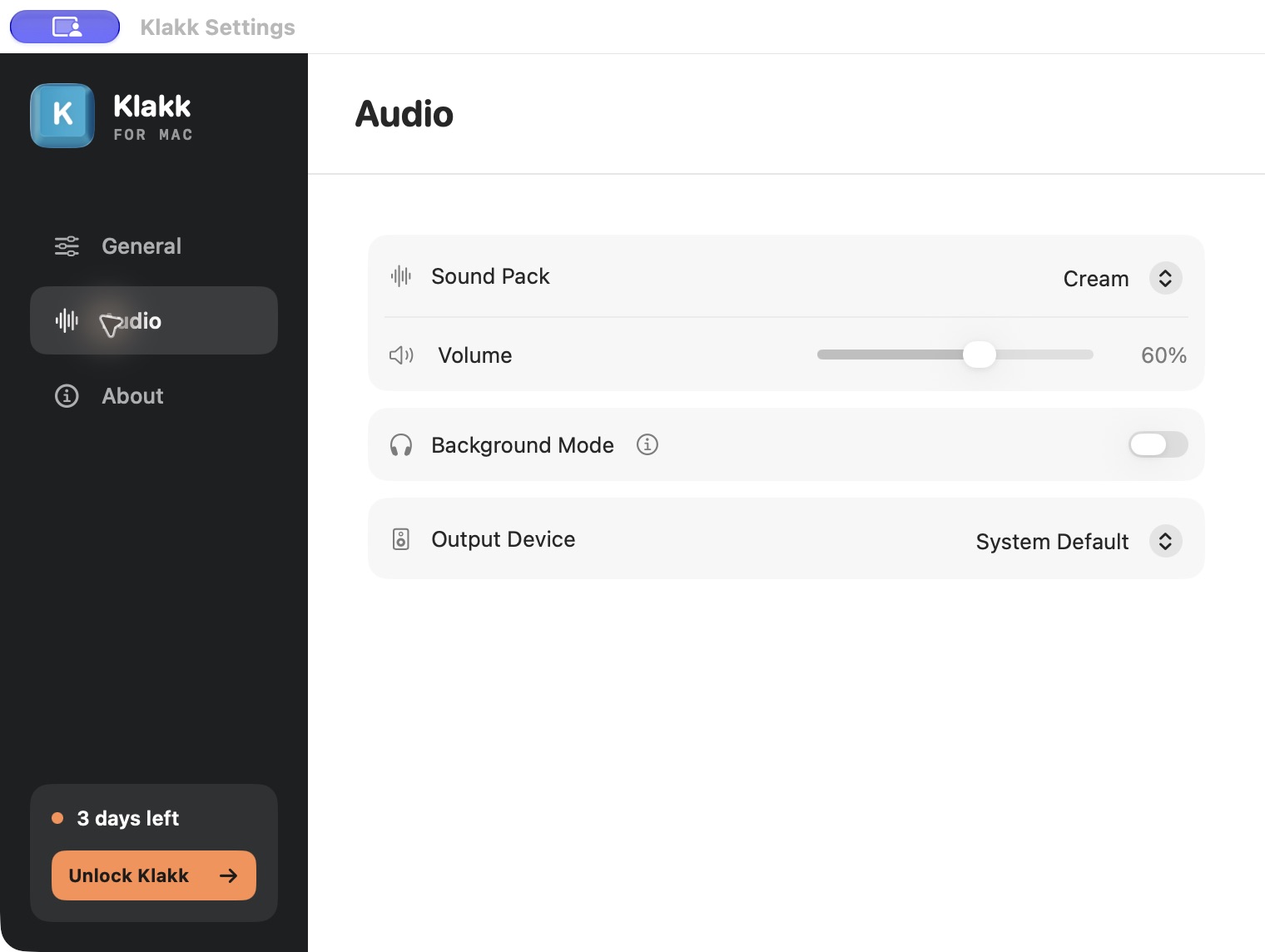
Klakk website Mac 1.4.1/build 23 has Audio → Volume for its own playback. It does not operate another application’s volume slider. Its current settings also do not offer automatic compensation against changes to the system-output volume.
If you already like one of Klakk’s recordings, adjust its level and the music player’s own volume first. Apple’s current support article distinguishes the Music and Apple TV app sliders, web-player controls and Mac Output volume/Mute. Those existing controls may cover the balance you want without another purchase. Not every player provides the same interface.
Keep the output you normally use at a comfortable level while comparing the two. If you later change that output’s level, change devices or use a hardware volume knob, reassess the balance. An app slider does not make those changes irrelevant. We do not provide a fixed-volume workaround or a measurement of sound pressure at your ears.
You can preview Klakk’s fourteen packs before downloading. The desktop trial lets you decide whether you enjoy one of those sounds with your usual music. A louder pack is not automatically a better recording, and preview controls do not establish the installed app’s balance with another application.
An output selector manages its own app’s destination
Klakk’s Audio → Output Device selects where Klakk plays: System Default or a device in its list. It does not reroute every app on your Mac. Selecting headphones also does not prove automatic silence whenever they are unavailable. The output and auto-mute comparison explains those separate conditions.
If you want a different typing level recalled for headphones and speakers, compare one current volume setting with per-output levels. Remembering the destination and remembering a level for each destination are separate features.
A mixer’s per-app routing has a broader job: selecting destinations for audio produced by multiple applications. If that is what you need, compare its documented controls and requirements. A sound library with an Output Device dropdown is not necessarily a replacement for a routing utility.
The purchases stay separate too. A Klakk license does not include SoundSource. A SoundSource license does not supply Klakk’s fourteen recordings or unlock its desktop app. One adds the sound; the other manages existing audio.
SoundSource is a separate Mac purchase to evaluate
Rogue Amoeba’s SoundSource publishes per-application volume and mute controls, with the ability to redirect an app to another output. Its Applications manual describes the individual level and output controls. This is a candidate when you want to manage several apps from one place, rather than add a mechanical keyboard library.
The current offer checked today is SoundSource 6.1.5, for macOS 15–27. The official purchase page lists a new license at US$49 plus applicable tax, with paid upgrade offers separate. Do not assume that the new-license price includes every future major release. These requirements are also different from Klakk’s website Mac minimum of macOS 14.
Its free download is a limited trial
The official trial explanation says SoundSource’s features are available in trial mode, with noise added to adjusted audio after twenty minutes. A free download therefore should not be treated as unrestricted permanent use. That limit is distinct from Klakk’s three-day first-launch trial.
Its permissions serve a different audio job
The current Permissions manual requires its Audio Routing Kit, or ARK. Installing it requires the Mac’s administrator password; ARK needs system-audio and microphone access for routing. Optional permissions support additional features. We have not installed ARK or granted access during this research.
Compare those requirements with the controls you need. They are different from Klakk’s Input Monitoring permission for responding to keyboard input. This is not a claim that either permission list makes an application safer, or that SoundSource overrides every device setting. Its published per-app controls also do not verify a Klakk pairing, playback through every output or fixed physical loudness.
Klakk’s Background Mode does another job
Klakk Mac’s Background Mode applies a 0.05 multiplier to its playback level while designated meeting, music or media applications are running. It reduces Klakk’s sound; it does not adjust those other apps or normalize everything you hear.
A designated music app can remain open after playback is paused. That running-app condition can therefore still reduce Klakk’s level. It is not a general “music is playing” or “microphone is active” detector. The pause and Background Mode comparison helps decide whether that behavior or manual playback control fits.
If you want to change a recording’s frequency balance instead of its overall level, compare source packs with audio effects. That is another capability to verify, rather than a feature implied by any volume slider.
Choose the purchase that supplies your missing feature
For added typing audio, Klakk’s website Mac trial includes all fourteen packs for three days from first launch. Continued use is US$4.49 once for Mac, plus applicable tax, with macOS 14+ on Apple silicon and Intel supported. If you want those recordings, choose the website trial and see whether the app’s own level and output choices are enough.
For broader audio management, evaluate the mixer with the actual applications and outputs you want to control. A published feature list and a working download do not replace that evaluation. Compare its trial limits and purchase rights before relying on it for routine use.
Klakk website Windows 1.4.1 separately supports Windows 10/11 on native x64 and ARM64, with an unsigned installer. Its website trial is also three days, and continued use is US$4.49 once for Windows plus applicable tax. Website Mac, Windows and Mac App Store licenses are separate. The Mac mixer discussed here is not a Windows option; the Windows volume comparison covers that platform’s controls.
Klakk handles input events and key codes locally without uploading typed text or raw keystrokes. Usage analytics and licensing communication occurs on both website platforms; Mac also has settings telemetry and needs Input Monitoring. See the Mac privacy policy and Windows policy. A separate routing utility has its own data and permission conditions.
You may already have enough control in Klakk and your media player. You may instead want one place to manage several apps. Those are reasonable different choices. Buy the missing capability you actually want, rather than assuming the two prices describe competing versions of the same product.
Frequently asked questions
Does Klakk’s Volume control change my music player’s volume?
No. Klakk’s current website Mac Volume changes its own playback level. It is not a control for another application or Mac output volume.
Does Klakk keep the same loudness after I change system volume?
Its current website Mac settings do not provide automatic compensation against system-output volume changes. Device settings and the output you use also affect listening level.
Does a SoundSource license include Klakk’s fourteen sound packs?
No. They are separate developers’ products. SoundSource manages audio; Klakk’s website license continues use of its included typing recordings after its first-launch trial.
Is SoundSource’s free download unrestricted permanent use?
No. Its official trial explanation describes a twenty-minute limit before noise is added to adjusted audio. Check the current license and upgrade offer for continued use.