
A quiet keyboard for a Mac starts with the sound the physical keys make in your room. Compare your current keyboard and any replacement in the same place, including Space and Return. If you want a different physical feel, test hardware. If you want extra sound while keeping your current keyboard, try a sound app separately.
Klakk adds recorded keyboard sounds to your Mac audio output. It cannot reduce the noise from switches, keycaps or the desk. Headphones can contain the added playback, but recording and meeting apps may also capture audio digitally.
This guide is prepared by Levin, Klakk’s developer, with AI assistance. It explains a way to check your own setup; it is not a measured ranking of keyboards or a guarantee of silence.
Identify which sound you want to change
| Your goal | Check first |
|---|---|
| Less typing noise in the room | Listen to the physical keyboard with sound apps off. Compare normal keys, Space and Return. |
| Less keyboard noise in a call or recording | Check the microphone position and captured audio sources, then listen to a short test. |
| Different key travel, force or feel | Try the physical keyboard. Added audio leaves those properties unchanged. |
| Mechanical-style audio in headphones | Preview an app, then check its playback on your chosen output. |
Room noise, headphone playback and captured audio are separate paths. Changing one does not establish what happens on the others.
Compare physical keyboards before choosing one
Start with the keyboard you already have. Type the same short passage at your usual pace. Listen from the seat where another person would hear it, if that is the problem you want to solve. Repeat a few presses of Space, Return and Backspace; one key can be more noticeable than the rest.
Use the same desk and position when comparing another keyboard. A model described as quiet, low-profile or silent still needs this check. We have not measured every MacBook, external keyboard or switch combination, so this guide does not name a universally quietest model.
For an external keyboard, confirm the manufacturer’s requirements for your Mac and macOS version. Check Command and Option placement, the function row, the connection you intend to use and any configuration software. If you can return or try the keyboard, use that opportunity to assess the complete board rather than buying from an isolated switch recording.
A desk mat, a different position or a change in typing force can be trial changes on your existing setup. Change one condition and repeat the passage. Treat the result as an observation about that setup, rather than a promised reduction in decibels. The physical keyboard noise guide explains the parts to inspect.
Check calls and recordings separately
Headphones tell you where you hear playback. They do not prove that a recording or screen share excludes that playback.
For example, OBS’s macOS audio capture guide explains that OBS 30 or later on macOS 13 or later can capture all desktop audio or audio from one application. A desktop or screen-capture source may therefore include added typing sounds even when those sounds play through headphones.
Check the microphone and any desktop, application, screen-sharing or virtual audio sources in the software you use. Make a short test with speech and typing, then listen back. For OBS, use the recording checklist; for calls, use the Zoom and Teams guide.
Try added sound if you want it
The website Mac edition of Klakk is 1.4.1, build 23, for macOS 14 or later on Apple silicon and Intel Macs. It includes 14 sound packs and a three-day trial from first launch. Preview the sounds in your browser before installing. The preview plays within the page; the desktop app is used for sound while typing in other apps.
The website Mac license costs US$4.49 once, plus applicable tax. Windows and Mac App Store licenses are separate, and the Store uses Apple’s displayed price. Check the download page for the edition you intend to use.
After installation, start quietly and compare two or three packs with the same passage. This is a sound preference test, rather than evidence of improved focus, accuracy or typing speed.
Confirm the headphone output
In Klakk’s Audio settings, check Output Device. System Default uses the Mac’s selected output; a named device selects that output for playback. After connecting or disconnecting equipment, confirm where you hear the sound rather than assuming a headphones-only rule or an automatic fallback.
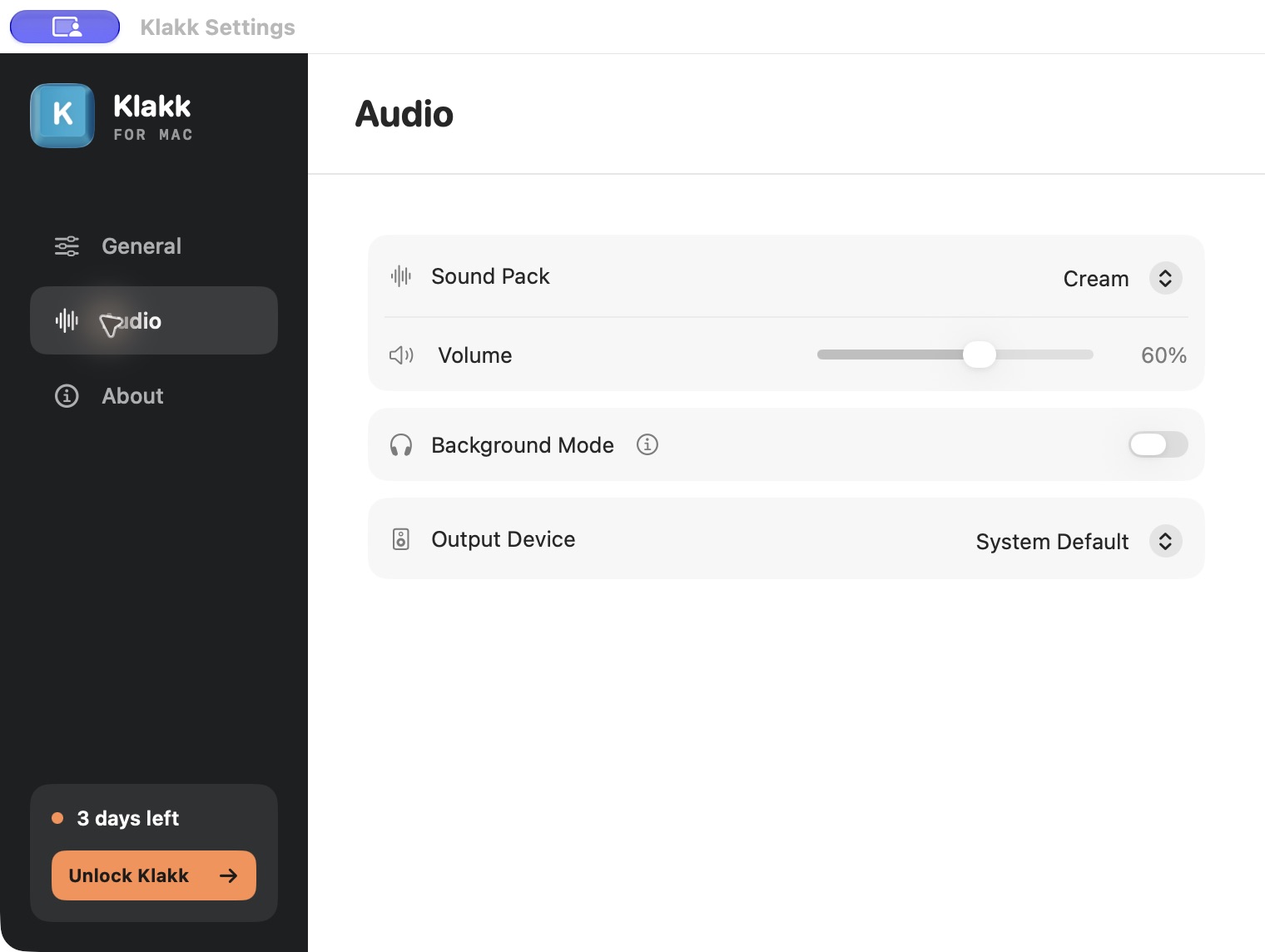
Apple’s sound output guide explains how to select an output in System Settings → Sound → Output. Check both the Mac’s output and the app’s setting when you troubleshoot playback. Your physical keyboard will still make its normal sound.
Review Input Monitoring and privacy
Apple describes Input Monitoring as permission for apps to monitor keyboard, mouse or trackpad input while you use other applications. The permission itself does not restrict an app to receiving timestamps or playing sound.
The current website Mac edition of Klakk processes physical key codes and press, release and modifier events locally for its sound behavior. It does not upload typed text or raw key events. Usage/settings and licensing communication still exist; read the privacy explanation for that edition before granting access. This developer explanation is not an independent security audit of every keyboard app or of other Klakk editions.
For setup or missing sound, follow the first-run guide. If you only want to sample the browser demo, you do not need to grant Mac Input Monitoring for that page.
A short check before spending money
- With added sounds off, compare normal keys, Space and Return in the actual room.
- If testing hardware, check the complete keyboard’s physical feel and Mac requirements.
- If testing Klakk, confirm the trial is active, select a pack and check the playback output.
- If using a call or recorder, check its sources and listen to a short speech-and-typing test.
- Keep the change that addresses the problem you observed. Recheck after moving the keyboard, microphone or output equipment.
These are suggested checks, not a completed laboratory test or a promised result. You can keep your current keyboard, change hardware, or add optional sound according to what you hear and need.
Frequently asked questions
Can Klakk make my physical keyboard quieter?
Klakk adds sound through the Mac’s audio output. It does not quiet the switches, keycaps, case or desk. Inspect the physical setup when room noise is the problem.
Are headphones enough to keep typing effects out of a recording?
Check the recorder or meeting app’s audio sources. Headphones can contain playback, while a desktop or application audio source can still capture it digitally. Confirm the result with a short test.
Does Klakk’s browser demo show desktop app latency?
The browser and desktop app use different playback paths. The demo is for sampling sounds. We have not published a verified total-latency benchmark for the website app, and a native app does not guarantee zero delay on every output.
When should I change the keyboard rather than add sound?
Test hardware when you need different key feel or less physical noise. Try optional playback when you are comfortable with your keyboard and want a different sound through your audio output.